
Tachlis AIPractical help for frum life.

Tachlis AI, or Tachlis for short, helps you write, research, understand documents, and get everyday things done. Bring a draft, a file, or a question, and work through it in a conversation.

Five free messages. No sign-in needed.

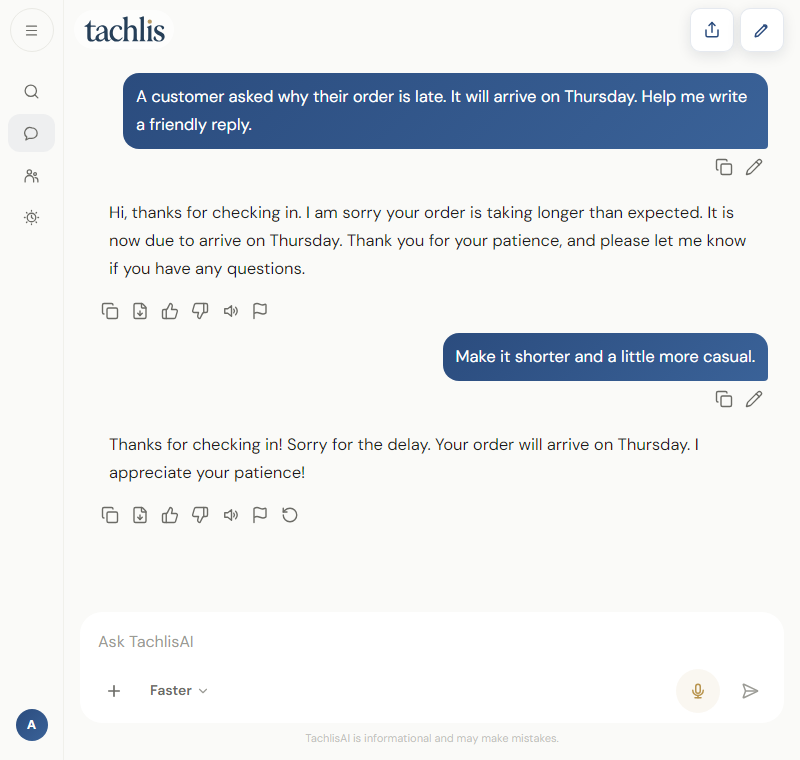
Example Tachlis AI chat: a customer reply revised to be shorter and friendlier.
An example conversation in Tachlis AI. Responses vary.

A useful place to start

Find the right words

Explain what happened and who you are writing to. Ask for a draft, then adjust the tone or length until it sounds like you.

Walk through a customer reply

Try asking

A customer asked why their order is late. It will arrive on Thursday. Help me write a short, friendly reply.

Make a long document useful

Upload a PDF and ask for the deadlines, requirements, or main points. Ask follow-up questions and check the cited pages against the original.

Turn a handbook into a checklist

Try asking

Read this school handbook. List the forms I need to return and their deadlines, with page numbers.

Prepare a notice people can use

Draft in English, Hebrew, or Yiddish. Explain who will read it, then refine the wording for your school, customers, or family.

Work through a bilingual school notice

Try asking

Translate this school notice into clear Yiddish. Keep the dates and phone number exactly as written.

You can also talk through an everyday question, create and edit images, prepare worksheets, and research a work question. File and image tools require an account.

How to use Tachlis

  1. Start with one real task

    Describe what you need, who it is for, and any details the answer should include.

  2. Keep talking

    Ask for a shorter version, a different tone, or an explanation of anything unclear.

  3. Review and use it

    Check names, numbers, sources, and important details before sending or relying on the result.

On your computer or phone

Use the website for files and longer work, download the app, or ask a question by message.

Before you start

Can I try it for free?

Yes. The homepage offers five messages without signing in. A free account gives you access to more tools, including file uploads and images, within usage limits. The Free access page lists the current allowance. See free access and limits.

What makes it kosher AI?

Content filtering stays on within Tachlis AI. You can choose a Hashkafa profile and an accountability partner in your account. These controls apply to Tachlis AI; they do not filter other apps or the rest of your phone.

Can I ask halacha questions?

General halacha questions are answered for learning, with a Not a psak notice. Requests for a binding ruling are referred to your rav. Check original sources before relying on an answer.

Is Tachlis the same as TachlisAI?

Yes. Tachlis is the short name for Tachlis AI, also written TachlisAI. You may also see it spelled Tachles or Tachlas. The website is tachlisai.com, and the iPhone and Android apps are listed as TachlisAI.
What do you need a hand with?

Start with the task in front of you.

Try Tachlis AI